Send invoices through QuickBooks
Turn finished stops into QuickBooks invoices and email them.
Dispatch doesn't take payments. It creates the invoice in QuickBooks and QuickBooks emails it and collects. Your books stay in QuickBooks.
Connect QuickBooks once
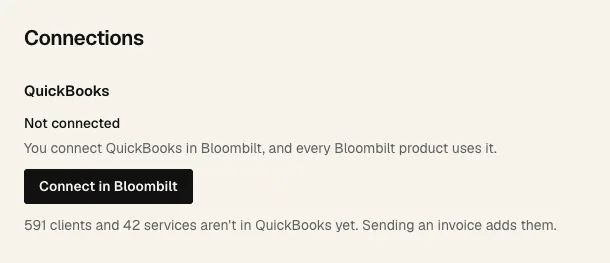
- 1 Open Settings, then Connections. An owner clicks Connect in Bloombilt and signs in to QuickBooks.
- 2 Dispatch tells you how many of your clients and services aren't in QuickBooks yet. They get created in QuickBooks when you send their first invoice.
- Match records ties your Dispatch clients and services to the ones already in QuickBooks. It matches exact names and emails only, so check any that are left over.
- Fill prices from invoices prices any job that has no price yet, from that client's QuickBooks invoices.
- Want customer requests from the crew to go to Front Desk as leads? Bloombilt connects that for you. Just ask.
Send an invoice
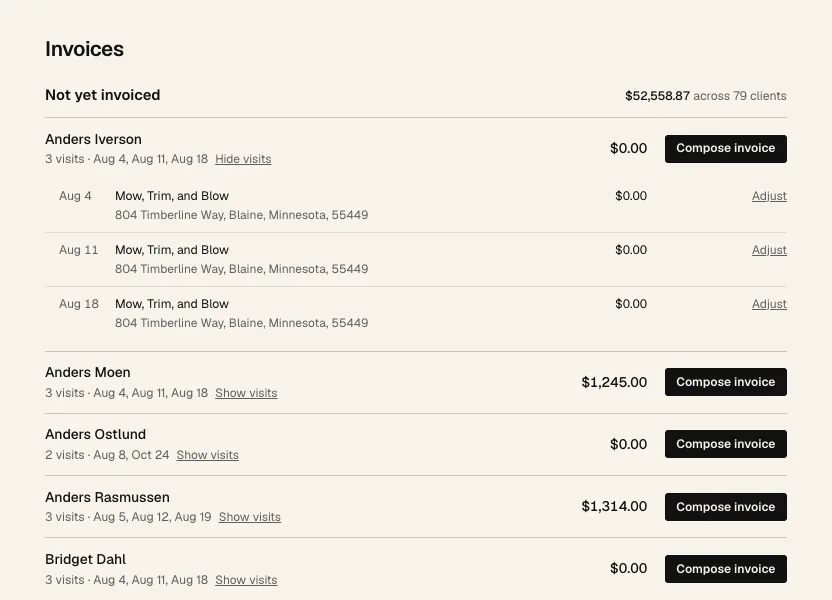
- Click Invoices.
- 1 Not yet invoiced is finished work you haven't billed, with the total at the right.
- 2 Each row is one client: how many visits, their dates and the total. Show visits lists the stops.
- 3 Need a different price for one stop? Click Adjust next to it, type the new amount and a reason, and click Save.
- Click Compose invoice on the client's row. This makes a draft. Nothing is sent.
- Check the draft. You can still adjust prices on it. Then click Add to QuickBooks. This creates the invoice in QuickBooks. Still nothing is emailed.
- Check the tax and total QuickBooks worked out.
- Click Send to customer. QuickBooks emails it to the client's email.
- A client with work at two addresses gets two invoices, one per address.
- Changed your mind? Discard draft puts the stops back. You can't discard once it's in QuickBooks.
- No email on the client? Add one on their client page, then send.
- If the client is inactive in QuickBooks, Dispatch asks if you want to reactivate them.
- Track payment in QuickBooks. Open in QuickBooks takes you there.